For many mobile gamers, location matters more than anything else. Whether you’re trying to
access region-locked events, explore new in-game maps, or simply play without walking long
distances, learning how to change location on iPhone or Android can completely transform the
experience.
At the same time, not every location spoofer is safe or reliable. Some tools break after system
updates, while others increase the risk of account warnings. That’s why choosing the best
location spoofer to change GPS on iPhone/Android is more important than ever, especially for
players who want smooth, long-term gameplay instead of short-term tricks. This guide explains
how GPS location changer works, what to look for in a trustworthy tool, and why many gamers
are moving toward safer desktop-based solutions.
Why Gamers Want to Change GPS Location?
Location-based games are designed to encourage movement in the real world, but real life isn’t
always convenient. Weather, distance, safety, and time limitations can all make normal
gameplay difficult. Here are the reasons why gamers want to change GPS location.
- Reach rare or region-exclusive content
- Join remote raids or global events
- Farm resources without constant travel
- Test strategies in different in-game environments
These needs explain the growing demand for tools that can change GPS location on iPhone or
simulate movement on Android devices in a controlled and realistic way.
Is It Safe to Use a Location Spoofer?
Safety depends less on whether you spoof and more on how you do it. Games typically detect:
- Unrealistic teleport distances
- Impossible walking speeds
- Modified or unofficial game apps
- Repeated abnormal behavior
Because of this, experienced players usually avoid modified APKs or injected game versions.
Instead, they prefer system-level GPS simulation, which keeps the official game untouched and
reduces detection signals. In short, the safest approach is using a stable location spoofer that
works outside the game itself.
Key Features of a Good Location Spoofer
Before choosing any tool, it helps to understand what actually matters in real gameplay.
- System-Level GPS Control: A reliable tool should change the device’s GPS data globally rather than modifying the game. This keeps gameplay closer to normal behavior.
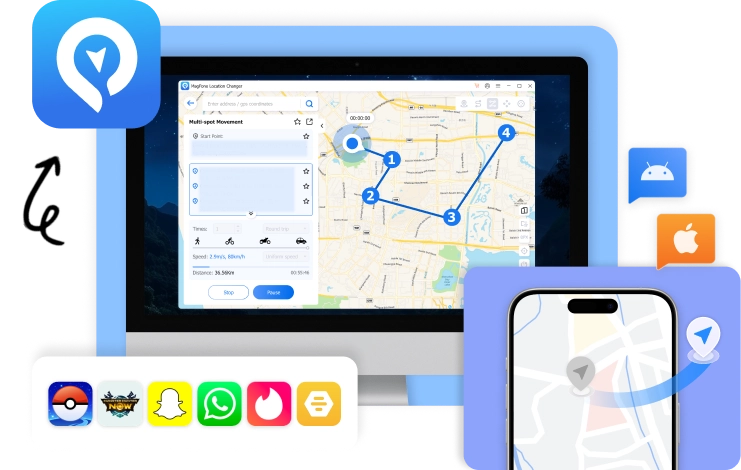
- Realistic Movement Simulation: Teleporting constantly is risky. The best tools provide walking routes, adjustable speed, joystick control, and cooldown awareness. These features make movement look natural instead of automated. Especially when you are play Pokémon Go, a good Pokémon Go spoofer helps you a lot.
- Cross-Platform Support: Gamers often switch between iOS and Android. A flexible solution that works across devices saves time and avoids complicated setups.
- No Jailbreak or Root Required: Security and stability matter. Tools that work without jailbreaking iOS or rooting Android are generally safer and easier to maintain.
Common Ways to Change GPS Location on Mobile
There are three main approaches used today.
- Modified Game Apps: These include injected versions with built-in spoofing. They’re easy to
install but carry the highest ban risk and often stop working after updates. - Mobile-Only Fake GPS Apps: Some Android apps can override GPS directly. While
convenient, they may cause instability or compatibility issues with newer systems. - Desktop-Based Location Simulation: This method connects the phone to a computer and
changes GPS externally. It’s widely considered the most stable and safest long-term
solution, especially for serious players.
A Balanced Option for iPhone and Android Players
Among desktop-based tools, MagFone Location Changer is frequently mentioned by gamers
looking for a dependable way to change their GPS position without complicated technical steps.
Instead of altering the game, it adjusts the device’s location data at the system level. This allows
players to keep using the official app while still accessing different regions or simulating
movement.

What makes this approach appealing to many users is the balance between control, stability, and
simplicity. Players can teleport to a new area, simulate walking between points, or use a joystick
for manual movement, all without jailbreaking the device. For gamers who mainly want
consistent performance rather than risky shortcuts, this style of location spoofing tends to feel
more practical over time.
How to Change GPS Location on iPhone&Android?
While exact steps vary by tool, the general process is usually straightforward.
Step 1: Launch the MagFone Location Changer and connect your phone with a cable. Trust the
computer so the GPS simulation can work properly.
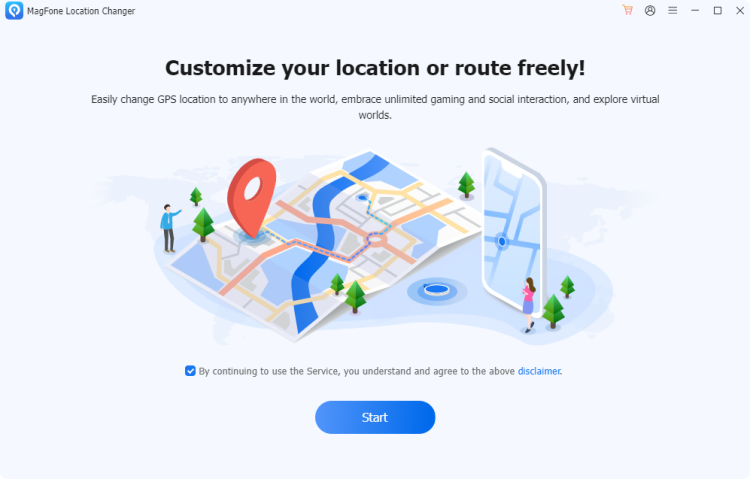
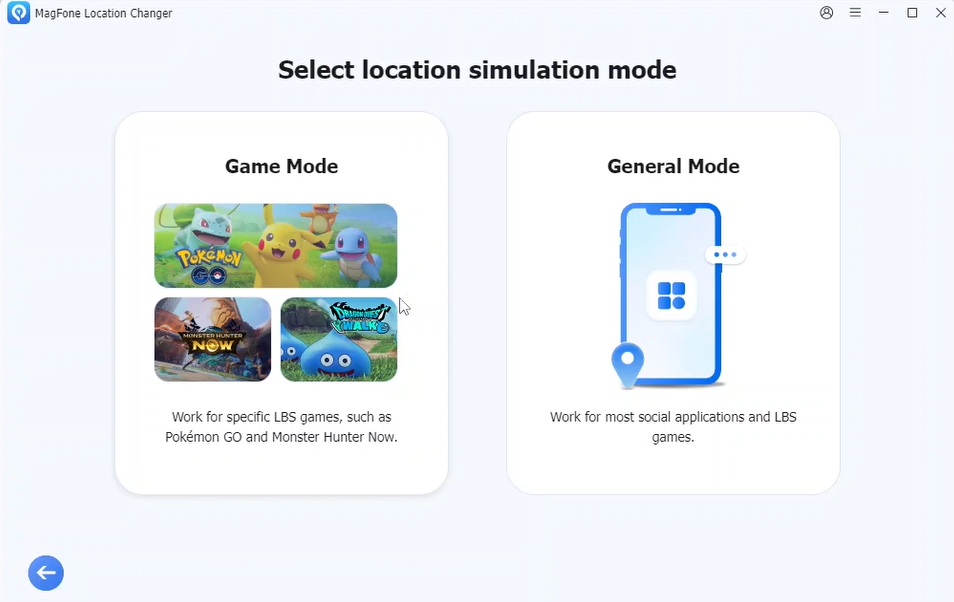
Step 2: Choose a General mode, or Game mode.
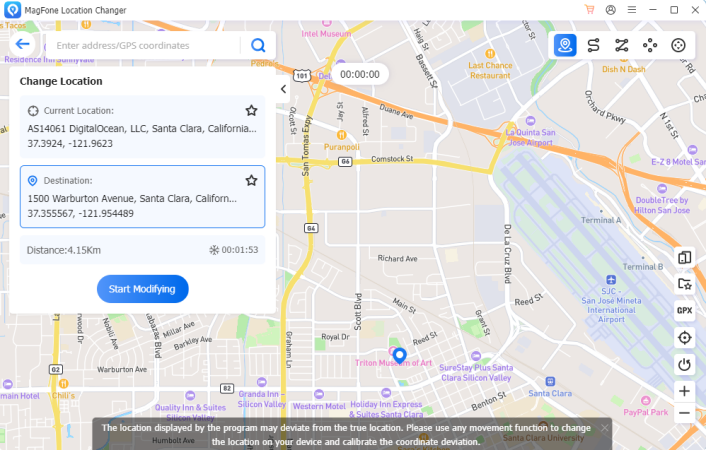
Step 3: After entering in map, enter coordinates or select a point on the map.
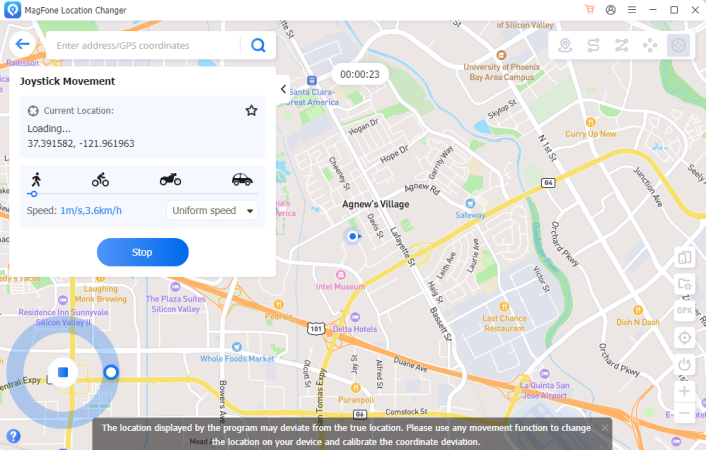
Step 4: Open the game normally. Once the GPS updates, gameplay continues as if you were physically there. The most important rule is still realistic behavior. You can use route simulation, or joystick control depending on your goal. Respecting cooldown times and avoiding impossible jumps helps keep accounts safe regardless of the tool used.
iPhone vs. Android: Which Is Easier to Spoof?
Each platform has its own challenges.
For iPhone
- Stronger system restrictions
- Fewer reliable spoofing methods
- Safer when using desktop simulation
For Android
- More fake GPS apps available
- Greater flexibility
- Higher risk if using unstable tools
Because of these differences, many long-time players prefer computer-assisted spoofing that works across both systems instead of relying on device-only tricks.
What Experienced Players Usually Prioritize
After the excitement of early spoofing fades, most gamers start caring about different things.
- Account safety over flashy features
- Stable tools over free but unreliable apps
- Realistic movement over instant teleporting
This shift is why desktop-based solutions continue gaining popularity. They simply match long-term gameplay better.
Final Thoughts
Changing your GPS location can open entirely new ways to enjoy mobile games, from accessing global content to playing comfortably at home. But the method you choose makes a huge difference in safety, stability, and long-term usability. Today, the most trusted approach isn’t modified apps or quick hacks. It’s system-level location simulation that keeps gameplay natural while giving players full control over movement.
For gamers searching for the best location spoofer to change GPS on iPhone and Android, the ideal choice is one that balances realism, reliability, and ease of use. Tools built around those principles like MagFone Location Changer fit naturally into how experienced players already approach spoofing: carefully, consistently, and with the long game in mind.