Neutron Executor is a modern Roblox script executor made especially for Android users. It allows you to run custom Lua scripts inside Roblox games to unlock extra features, automate tasks, and enhance gameplay.
This executor has gained popularity because of its smooth performance, clean interface, and frequent updates. At the moment, Neutron is only available for Android. There is no official iOS or PC version yet, and the developers have not shared any future plans for those platforms.
The APK is tested for stability and works without crashes on most devices. Users can also join Neutron’s Discord server for update news, bug fixes, and script sharing.
Many players now choose Neutron as a top alternative to Krnl and Delta Executor. Krnl has shut down permanently, while Delta is still under maintenance—making Neutron one of the best working options today.
What Is Neutron Executor?
Neutron Executor is a Roblox script tool that lets you inject and execute Lua scripts inside games. These scripts can help automate grinding, unlock hidden features, or modify gameplay behavior.
It is lightweight, fast, and designed for mobile users who want a simple executor that runs popular Roblox scripts smoothly.
Neutron supports many trending games such as:
- Blox Fruits
- The Forge
- Break a Lucky Block
- Devil Hunter
- Fish It
- 99 Nights in the Forest
- Plants vs Brainrots
Because of its built-in injection system and script loader, Neutron is often compared with executors like Delta, Ronix, and Xeno.
Key Features of Neutron Executor
- 🌐Cross-Platform Engine: Although designed for Android, Neutron’s core allows smooth performance across multiple operating systems.
- 🧠 Multi-Language Script Support: Run JavaScript, TypeScript, Shell, Batch, and basic Python scripts with ease.
- ⚡ Lightweight & High Speed: Optimized to work even on low-end systems while maintaining fast execution.
- 🔍 Live Output & Debug Tools: See real-time logs, syntax highlights, and errors for better script testing.
- 🔐 Secure & Private: No data tracking. Regular security updates ensure safe script execution.
- 🛠️ Beginner-Friendly Interface: Simple design that makes it easy for both beginners and advanced users.
How to Download & Install Neutron Executor APK
Follow these steps to get started:
- Tap the Download Neutron APK button.
- After downloading, open the APK file and allow installation from unknown sources.
- Complete the install and launch the app.
- Open Roblox and log in to your account.
- Join the game where you want to use scripts.
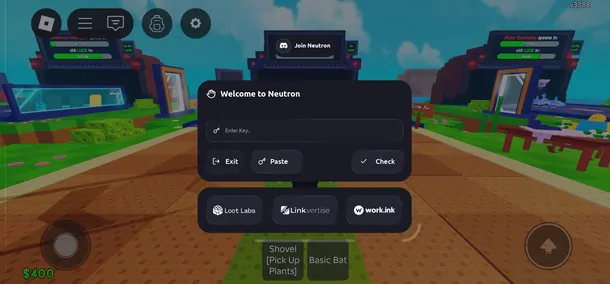
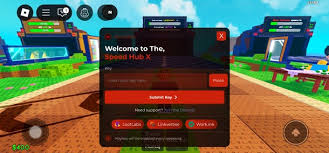
- A pop-up will appear asking you to get a key.
- Copy the key, return to Neutron, and paste it.
- Add your script and tap Execute.
- The script dashboard will appear, and your script will start running.
How to Download Neutron Executor on Windows?
- Turn off real-time protection from Windows Security.
- Click the Download button for Neutron Executor V3.
- Extract the downloaded file using WinRAR or 7-Zip.
- Open electron.exe to launch the executor.
Why Choose Neutron Executor?
- Fast Lua execution
- Clean and simple UI
- Regular updates
- Lightweight for mobile
- Works on trending Roblox games
- Active community support
How to Get Neutron Executor Activation Key?
- Neutron Executor uses a key system for security.
- Click the Get Key option inside the app.
- You’ll be redirected to a Linkvertise page. Complete the steps shown.
- After verification, your key will be generated.
- Paste the key into the executor and click Submit.
How to Use Neutron Roblox Executor?
- Open Roblox and join any game.
- Minimize Roblox and launch Neutron Executor.
- Enter your activation key.
- Choose a script from the list or paste your own.
- Click Execute and wait for the success message.
Best Alternatives to Neutron Executor
If Electron is not working on your device, try these popular Roblox executors: